Pool Explained
SR
Problems and solutions

Filters and sediment

Sand in your pool: filter fault or dirt from outside?

Dust, pollen and dead algae can look like sand. Hard grains that reappear below return jets call for a check of the sand filter and its valve.

Important: a filter is a pressure vessel. Stop the pump before moving the valve. Never open the tank until all pressure has been released according to the model’s instructions.
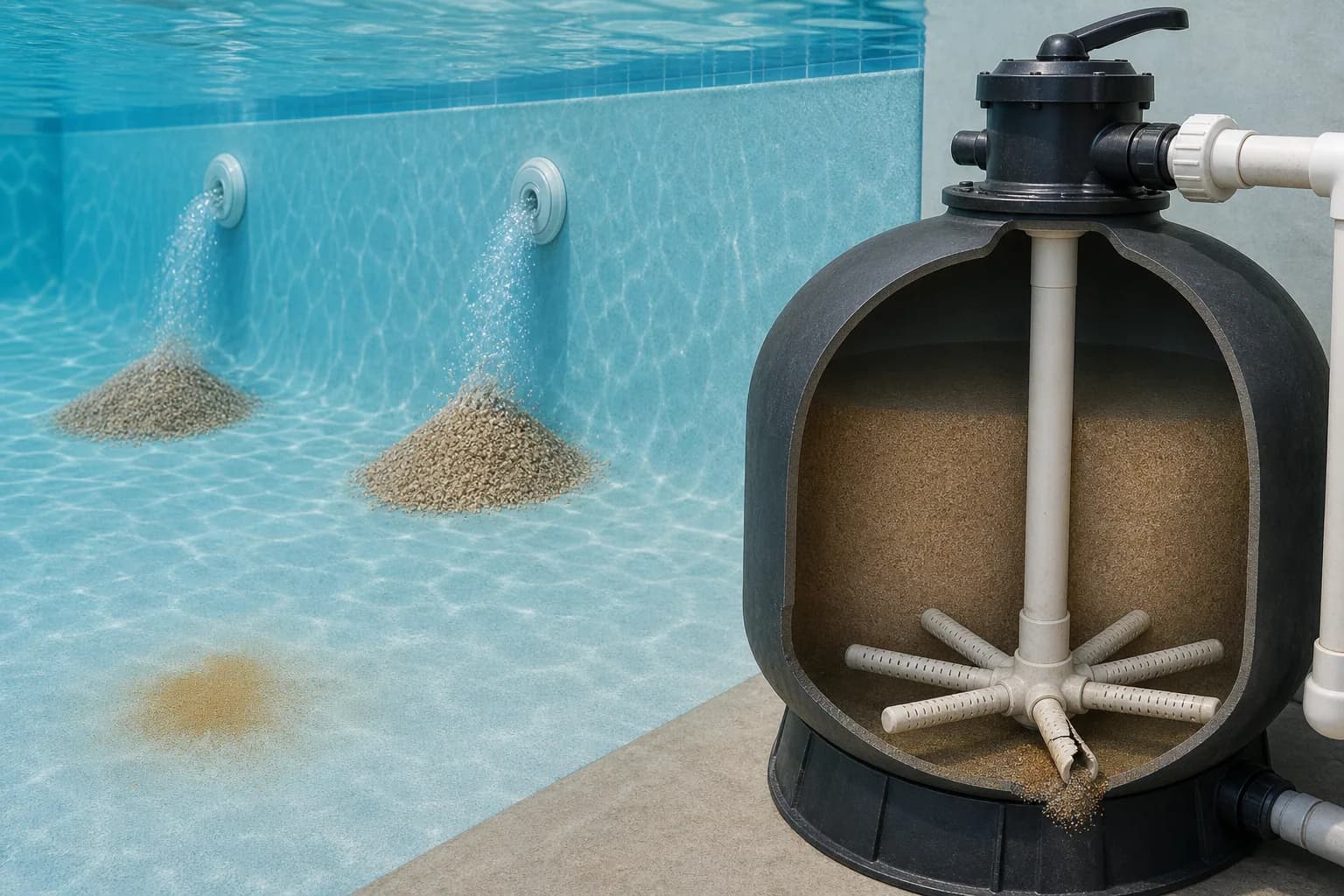
Sand below pool returns, fine sediment and a sand-filter cutaway with a damaged lateral

How to find out where sand in your pool is coming from

Sand on the pool floor may have blown in or been carried in from the deck or on footwear. It can also come from a sand filter. Where it collects and when it reappears are the most useful clues.

Written and edited by: Pool Explained editorial team

1

Check where and when the sand appears

If grains appear after swimming, windy weather or garden work, particularly around the steps or entrance, they are more likely to have come from outside. Clean the floor and see whether the problem returns while nobody is using the pool.

If sand returns below the jets after filtration or backwashing, check the filter. Photograph the clean floor before starting the pump and take another photograph a few hours later to help identify the pattern.

Look closely at the grains too. Filter media is usually more uniform and coarser than dust or soil carried in from outside.

2

If you suspect the filter, find the fault before replacing the sand

Sand may escape through damaged laterals or other internal parts. It can also be associated with an incorrectly positioned multiport valve, a fault introduced during servicing or an unsuitable flow rate. The possible causes depend on the filter's design.

Switch off the pump before moving the valve or opening the system. Check the manufacturer's backwashing and servicing instructions. If media keeps returning, or you are unsure how to dismantle the filter safely, call a service technician.

3

Clean the floor and check whether the sand returns

Vacuum the settled material carefully. If your system supports vacuuming to waste, this prevents fine debris from returning through the filter. If it does not, do not try improvised valve positions.

After cleaning, run filtration normally and inspect the same spot a few hours later and again the next day. If the sand does not return, it probably came from outside. If it appears after a particular operating mode, record when this happens so a technician knows what to check first.

Check a sample

Distinguish sand, dust and algae remains

Hard and grainy

The material feels gritty and does not smear easily. If it appears below returns after filtration, check whether it is coming from the filter.

Soft and powdery

Dust, clay and pollen disperse easily and collect in quiet areas. Wind, nearby work and surrounding soil can keep introducing more.

Slippery or coloured

Greenish, brown or grey deposits that disperse easily may be organic material or dead algae. Check disinfectant, pH and circulation.

Only after vacuuming

Very fine dirt can pass through the filter and return to the pool. This differs from the filter releasing its own media.

What to do next

What to check before opening the filter

Do not dismantle the filter until the sample, deposit location and recent operating history indicate that media is actually escaping from it.

  1. 1Move the multiport valve only with the pump switched off.
  2. 2Collect a sample from the floor in a clear container or fine net. Check texture, colour and whether it smears.
  3. 3Clean a small floor area and note where material first returns: below jets, in depressions or everywhere after wind.
  4. 4If safe, watch the returns when filtration starts. A brief dust cloud after servicing is different from a continuous stream of grains.
  5. 5Note what happened before the problem: media replacement, moving a valve with the pump on, vigorous backwashing, nearby construction, algae treatment or a storm.
  6. 6Check that backwash and rinse were carried out in the manufacturer’s order. Valve settings and procedures vary between systems.
  7. 7If hard grains keep coming from the returns, stop the system and arrange a safe inspection of the valve and filter internals.

Sand filter

How sand can escape from the filter

Laterals

Slots in the lower collector arms retain media while letting water through. A cracked, loose or installation-damaged lateral can allow grains into the return pipe.

Central standpipe

A cracked or displaced pipe, or a poor connection to the valve, can let sand enter the return line. Forcing the valve into position during assembly can cause damage.

Multiport valve

A damaged internal seal or mechanism can send water and dirt along the wrong route. Water leaking to the waste line can be another symptom.

Incorrect media

Type, grain size and quantity must match the filter label and manual. Media that is too fine or not approved can pass through the collectors.

Too much media

An overfilled tank lacks the free space needed for the media bed to expand during backwashing. Use the model’s specified quantity, not a visual estimate.

Insufficient initial rinsing

New media can contain fine dust. The prescribed initial backwash and rinse procedure prevents it being sent into the pool.

Where it collects

Where and when the sediment reappears

What you seeLikely cause to checkNext steps
Grains below one or more return jetsFilter media or dirt coming through the returnsClean the area, restart filtration if safe and watch the returns. Never open a pressurised filter.
Sediment only in corners or still areasDust, pollen, soil or dead algaeTake a sample, check water chemistry and circulation direction, then vacuum the sediment carefully.
Appears immediately after changing mediaFine dust, incorrect quantity or grain size, or assembly damageCheck the media specification and initial rinse procedure. Stop filtration if grains are coming out of the returns.
Material returns after vacuumingVery fine dirt passes through the filter, or the valve is in the wrong modeCheck the valve position and whether vacuuming to waste is supported.
Grains appear while water also leaks to wastePossible multiport-valve faultStop the pump and arrange a valve and seal inspection.

Backwash and rinse

How to backwash and rinse correctly

Follow the filter’s backwash duration

The manual specifies the duration or finishing criterion, often using a sight glass. Excessively long or forceful backwashing is not better.

Rinse before returning to filtration

On systems with a rinse setting, a short rinse after backwashing sends the first dirty water to waste and settles the media before filtration.

Stop the pump before moving the valve

Change valve positions only with the pump off. Moving the valve under flow can damage its seal or mechanism and create dangerous pressure.

Record clean-filter pressure

Record the clean-system pressure at the same pump speed. A rise from that baseline is a more useful cleaning indicator than a fixed date.

Removing the cause

Choose the treatment for the type of sediment

Dust and pollen

Brush towards the cleaning route, improve circulation and clean nearby surfaces. Vacuum fine sediment slowly. If the system allows vacuuming to waste, it can prevent fine material returning through the filter.

Dead algae

Test and correct disinfectant and pH as needed, then remove the sediment. Vacuuming without treating the cause usually gives only temporary improvement.

Fine dust from new media

Repeat the initial rinse as instructed. If larger, hard grains still appear, the problem is probably more than dust from new media.

Damaged lateral or standpipe

Drain, open and inspect the filter only after isolating power, safely positioning valves and releasing all pressure. This is a sensible job for a service technician.

Valve fault

Seal and internal inspections depend on the model. Do not glue, lubricate or force parts without the correct instructions. An unsuitable product can cause further damage.

Wrong media or quantity

With the system safely isolated and depressurised, replace the media with the specified type and quantity. Protect the standpipe and follow the model’s filling procedure.

If you have a cartridge filter

Find where the grains or fine deposits come from

Cartridge filters contain no sand

If the system uses only a cartridge, hard grains cannot be its filter media. Check surrounding soil, grout, scale, corrosion and other external sources.

Fine particles can still return through the jets

A damaged, incorrectly seated or unsuitable cartridge can allow fine particles through. Inspect pleats, end caps, the central seating and seals.

Flocculant is not suitable for every filter

Not every product is compatible with every cartridge or system. Check both the chemical label and filter instructions before use.

When to call a technician

Stop the system if you notice these signs

the filter, clamp, valve or tank is cracked, leaking or moving
the pressure gauge does not return to zero after shutdown and pressure release
hard grains repeatedly appear in the return flow
the work requires opening a tank, valve or electrical equipment without clear instructions
the pump draws air, rattles, runs dry or trips electrical protection
the correct media, quantity or valve position for the model is unknown

Prevention

How to prevent sand from returning

Keep the model details

Photograph the filter label, valve and original pipe positions. Record media type, grain size and quantity whenever it is changed.

Protect the internal parts

Keep the standpipe centred and covered during media replacement. Add media as instructed to avoid damaging the laterals.

Move the valve only with the pump off

Stop the pump, let the system settle and move the handle fully into the marked position.

Record where sediment appears

Photos of the location and sample, plus the time of appearance, help distinguish filter faults from water or environmental problems.

FAQ

Sand and sediment questions answered

How can I tell filter sand from dead algae?

Filter media is usually hard and grainy. Organic sediment is softer, slippery or easy to smear. Where and when it appears helps too: grains below returns after filtration point more strongly towards the filter.

Is some dust normal after changing the sand?

New media may contain fine particles that the initial rinse should remove. A continuing return of harder grains should not be ignored.

Are laterals always responsible when sand returns?

No. Possible causes include the standpipe, its valve connection, the multiport valve, incorrect media or overfilling. Inspect methodically rather than replacing the first suspected part.

Can I vacuum the sediment through the filter?

Small amounts of suitable debris can be filtered, but very fine material may pass through and return. Vacuuming to waste is an option only if the system supports it and a safe water level is maintained.

Why does material appear only when the pump starts?

The initial flow can flush material left in a return line or valve. Sampling it and checking whether it keeps recurring helps distinguish leftover dust from an ongoing internal fault.

When should I stop filtration?

Stop if genuine media grains repeatedly return, the filter or valve is leaking or damaged, or air accumulates. Do not open a pressurised vessel or attempt internal work without the required knowledge.